Attendance form

The attendance form contains the following information:
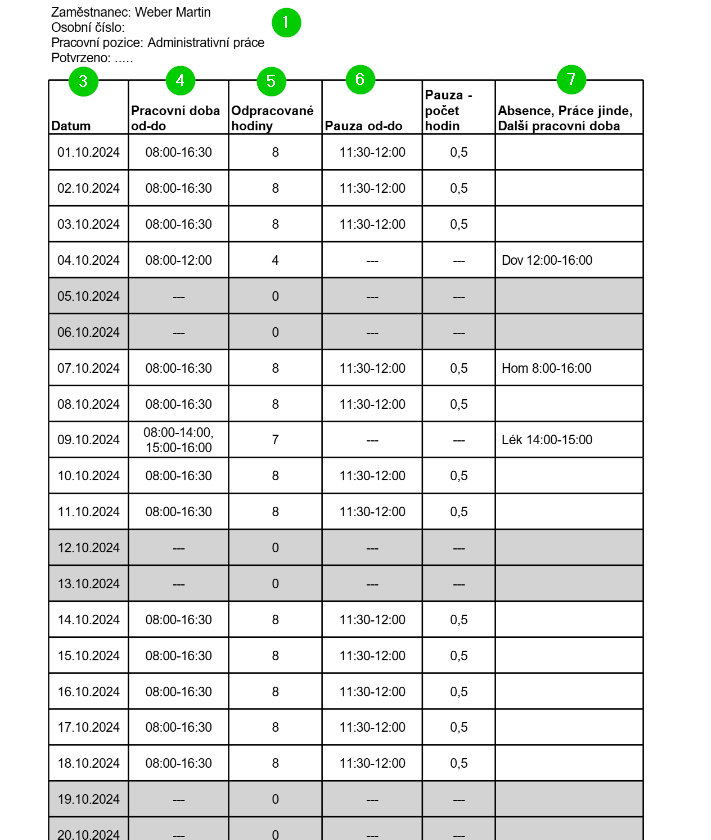
- The attendance header contains employee information and, in the case of approved attendance, the date and time of approval and the event identifier.
- The footer contains the name of the person who closed the attendance and the date and time of closing.
- Each row of the table represents one day in a given month.
- The Working hours column lists the employee's working hours on the relevant day (including lunch break).
An employee can have different working hours on different days of the week. This is based on the working hours schedule set in the employee's profile on the Work details > Working hours tab.
- The number in the Hours worked column indicates the number of hours actually worked on a given day. This does not include lunch breaks or absences, such as vacation or doctor's visits, etc. On the other hand, work elsewhere, such as home office, is counted as time worked.
- The Break from-to and Break - number of hours columns indicate when the employee took their lunch break and how long it lasted.
If the employee had any absence (even partial) on a given day, the lunch break is not filled in. The absence may interfere with the break and the data would then not correspond to reality. - The Absence, Work elsewhere and Additional working hours columns show the number of hours that the employee did not work on a given day (absence from working hours), or worked but was not at their usual workplace (Work elsewhere – typically home office).
The attendance can be saved or printed using the buttons at the top of the form.

