Completing employee onboarding

After logging in to Pinya HR, the new applicant will see the welcome page (see the article Employee onboarding).
It is used to carry out employee onboarding and track its completion.
The completion method is governed by the content set on the home page.
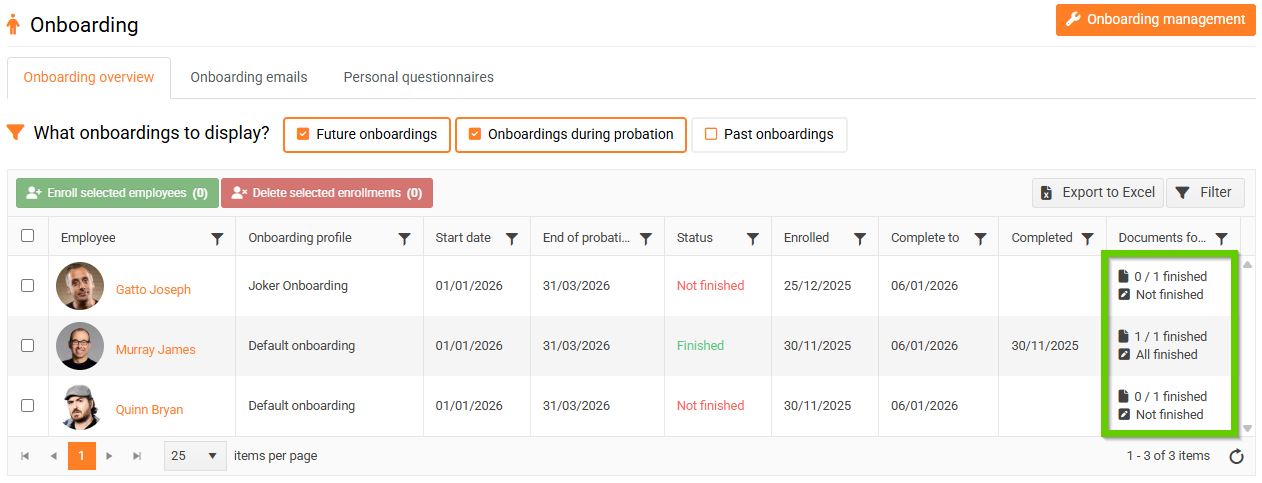
Document and question status in overview
In the overview, the status of documents and questions is always displayed in two lines, regardless of whether the home page contains documents, questions, or neither:
- 1st row = Documents – number of unread / total number of documents
- 2nd row = Questions – status: All Completed or Not Completed
The following rules apply:
- If no documents are set, the value 0 / 0 is displayed.
- If no questions are set, All Completed is displayed.
- If neither documents nor questions are set, both lines will be displayed: 0 / 0 and All Completed.
When is the boarding completed?
Employee onboarding can be completed in two ways (status: Completed):
- After meeting all requirements on the home page
- Automatically after one month
1. After completing all the requirements on the home page
If the introductory page contains documents to review, questions, or a combination of these, the Completed status will only be set after confirming that all documents have been reviewed and all questions have been answered.
2. Automatically after one month
If the home page does not contain any documents to review or questions, the status Completed is automatically set one month after the candidate is registered. Until then, the home page is still displayed.